Someone(Dchard) on the Internet has found a possible solution(typos corrected):
1. Set up an SSH connection in Putty with the tunneling settings below:
- Local ports accepts connections from other hosts [tick]
- Remote ports do the same [tick]
- Set up a dynamic port forward with source port 8080 (this will force the ssh server to act as a socks server)
- Set up a remote port forward with source port 50000, and Destination 127.0.0.1:50000 (this will forward the server's 50000 port to the local 50000 port. This could be changed if port 50000 is not open on the server).
Note that the forwarded ports (remote port forward) on the server side are bound to the loopback interface by default, so you must first check your SSH server's config, and set "GatewayPorts yes" in it's config file (sshd.conf). By default GatewayPorts is set to no!
2. Connect via SSH (note that in default, only the root user can forward ports)
3. Set up uTorrent with the following settings:
- Port used for incoming connections: 50000
- Proxy server: Socks5
- Proxy address: 127.0.0.1
- Proxy port: 8080
- Select resolve hostnames through proxy
- Do not select Authentication, and Use proxy for peer to peer
Go to advanced settings an set bt.allow_same_ip to "true"
Restart uTorrent.
What we can achieve with this:
Now from behind a firewall and/or a proxy with even no direct internet connection we managed to get uTorrent working in active mode.
With the above settings the tracker announces are working, the peer list got downloaded, the uTorrent port checker says that the port forwards are OK, and the download starts and there are several incoming connections (flag I set) among the clients, and the uploads are also working fine.
Showing posts with label port forwarding. Show all posts
Showing posts with label port forwarding. Show all posts
Tuesday, July 22, 2014

Wednesday, June 18, 2014
How to forward ports with Putty to a remote computer with 2 simple steps
In putty configuration: Connection → SSH → Tunnels:
Here I used a random port 58808:
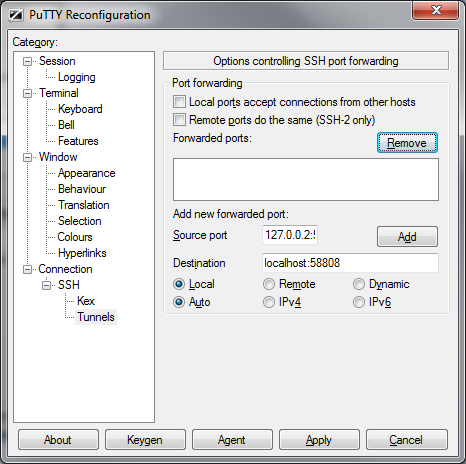
1) Input "127.0.0.2:58808" to Source port, you can also use "localhost:58808" or "127.0.0.1:58808", depending on compatibility and preference.
2) input "localhost:58808" to Destination,
3) Check "Local" and "Auto", then click "Add".
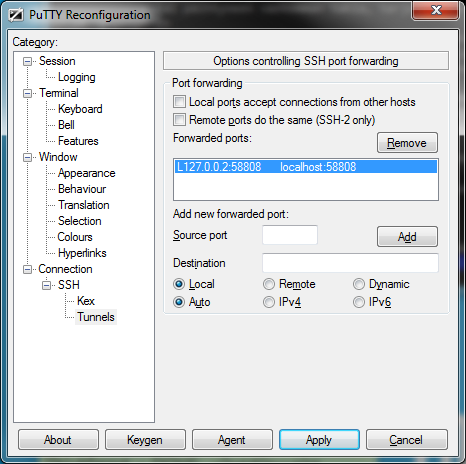
And you're done!
Now you can connect to your localhost(127.0.0.2) using your defined port and it will forward it to your remote computer.
You can also forward to different and multiple ports, if desired.
Here I used a random port 58808:
1) Input "127.0.0.2:58808" to Source port, you can also use "localhost:58808" or "127.0.0.1:58808", depending on compatibility and preference.
2) input "localhost:58808" to Destination,
3) Check "Local" and "Auto", then click "Add".
And you're done!
Now you can connect to your localhost(127.0.0.2) using your defined port and it will forward it to your remote computer.
You can also forward to different and multiple ports, if desired.
Subscribe to:
Posts (Atom)